
Reservations with the Lisboa Card
For Torre de Belém and Mosteiro dos Jerónimos, a free online reservation with your Lisboa Card is mandatory. Here we show you step by step how to book your time slot ticket - the process is identical for both attractions.
Important: Lisboa Card must be collected first
The reservation for Torre de Belém and Mosteiro dos Jerónimos only works if you enter the code of your physical Lisboa Card. You can therefore only make a reservation once you have collected your card at one of the Ask Me Lisboa locations. You will find the card code on the front of the card in LC 000000000 format.
How to book your ticket - step by step
The screenshots show the process using the Torre de Belém as an example. The process is the same for the Mosteiro dos Jerónimos—in Step 1, you simply select the other tile. It takes less than five minutes from selection to confirmation.
Open reservation portal
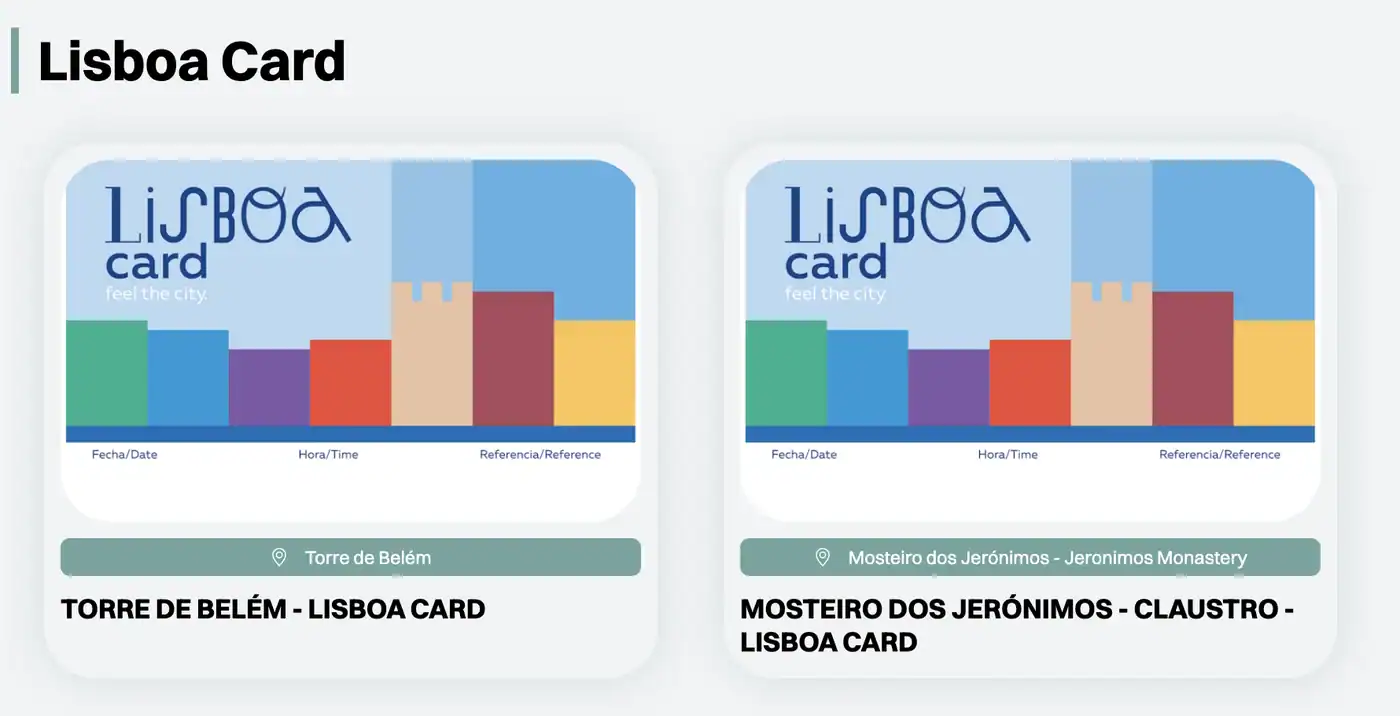
Clicking the link below will take you directly to the Lisboa Card overview on the official website. There are exactly two tiles to choose from: „TORRE DE BELÉM – LISBOA CARD“ and „MOSTEIRO DOS JERÓNIMOS – CLAUSTRO – LISBON CARD“. Click on the tile for your attraction.
🔗 To the portal's Lisboa Card overview
Select a visit date
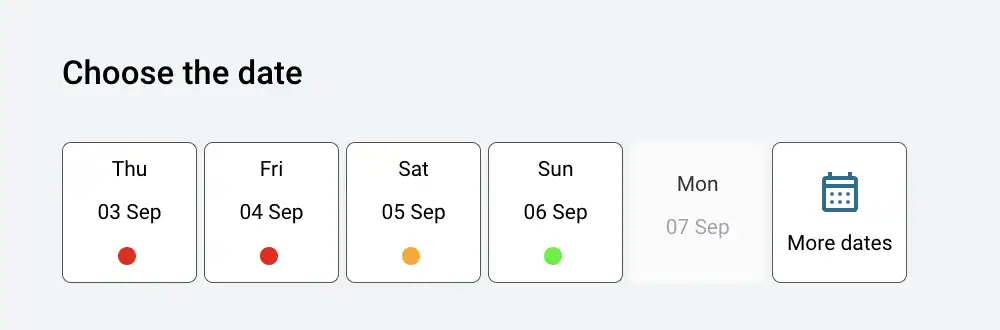
On the details page, select the option on the right under „Choose the date“ your visit date. The colored dot below each date shows availability: green means plenty of open spots, orange means they're running low, and red means it's almost fully booked. Via „More dates“ Come on later dates. Days shown in gray are closed—both Belém monuments are closed on Mondays.
Select time window
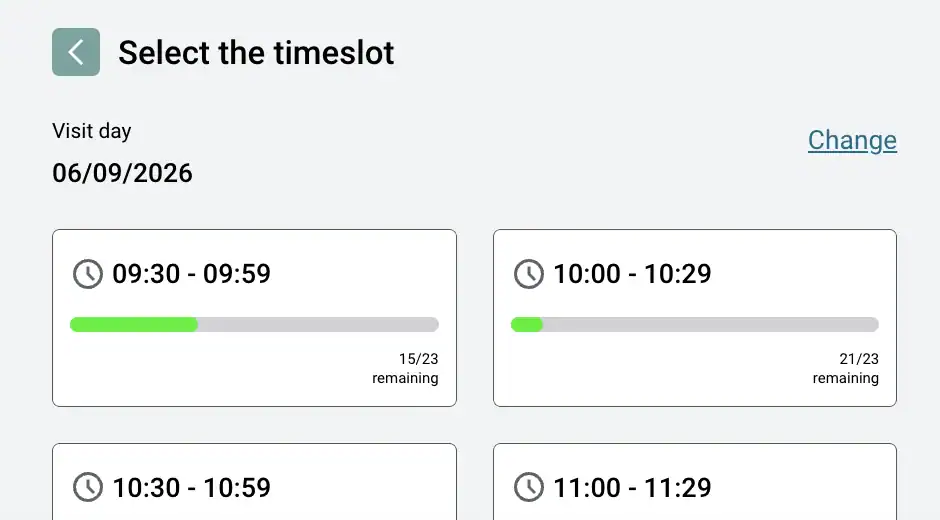
The following appears directly below it „Select the time slot“ showing all time slots for the selected day. Below each slot, it shows how many spots are still available (for example, „15/23 remaining“). Select your time slot — with „Change“ You can change the date again. The first time slots right when it opens are the least crowded.
Enter your email address
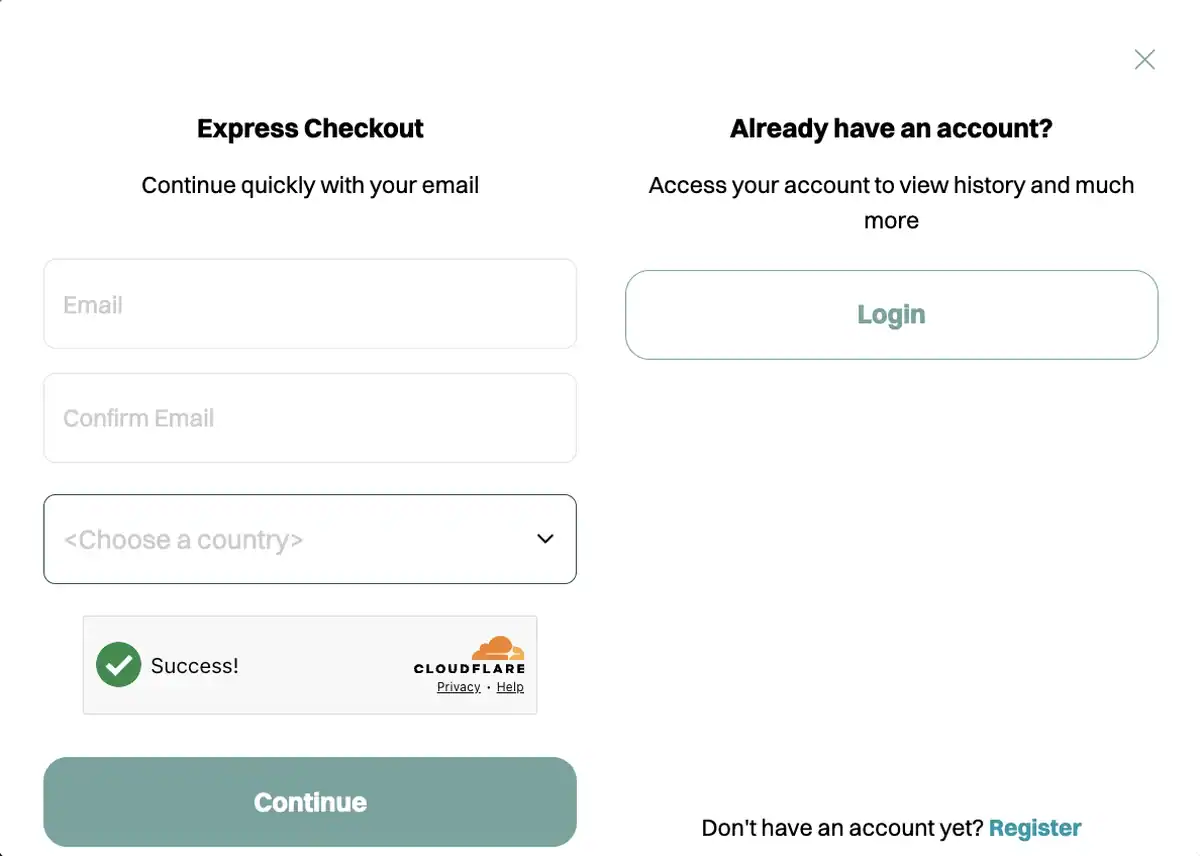
After selecting a time slot, the checkout window opens immediately. The fastest way to „Express Checkout“: Enter your email address, confirm it in the second field, select your country, and click „Continue“ Click. If you already have an account on the portal, log in via „Login“ — but you don't need an account to make a reservation.
Activate the discount and enter the card code
In the final step, you specify the number of tickets and complete the booking. The regular admission price is displayed first—in the payment panel, select the option „LISBOA CARD 100.00 %“ and then enter the code from your physical card. It's located on the front in the format LC 000000000. Only then does the price drop to 0 €.
Once you've completed the process, a confirmation with your personal QR code will appear on the screen; you'll also receive it via email. You can print out the ticket or show it on your smartphone. The QR code will be scanned at the entrance—to do this, you’ll need to present your physical Lisboa Card ticket at the validation device. You can find the specific details for each attraction in the sections below.
Important information on the individual attractions
Torre de Belém
The Torre de Belém is located on the peninsula in the Tagus. Free entry with the Lisboa Card - but booking is compulsory.
- Opening hours: Tue-Sun 10:00-17:30 (Oct-Apr) or until 18:30 (May-Sep). Closed on Mondays.
- Validation on site: The QR code of your ticket will be scanned at the entrance. In addition, you must present your physical Lisboa Card at the dedicated validation device - the ticket will only be valid after successful card validation.
- How to get there: Tram 15E from Praça do Comércio to the Largo da Princesa stop, then about 10 minutes on foot.
- In summer and at weekends, we recommend booking several days in advance - the popular morning time slots are often booked up quickly.
Mosteiro dos Jerónimos
A UNESCO World Heritage Site in the Belém district—a masterpiece of Manueline architecture and the final resting place of Vasco da Gama. Admission is free with the Lisboa Card—but reservations are required. The reservation process is identical to the 5-step guide above; on the landing page, simply select the Mosteiro tile labeled „LISBOA CARD.“.
- Opening hours: Tue-Sun 09:30-17:30 (Oct-Apr) or until 18:30 (May-Sep). Closed on Mondays.
- Validation on site: The QR code of your ticket will be scanned at the entrance. Your physical Lisboa Card will also be checked.
- How to get there: Tram 15E from Praça do Comércio or bus 728 to the Mosteiro dos Jerónimos stop.
- Tip: Mosteiro and Torre de Belém are only a few minutes' walk apart - you can make both reservations for the same morning and combine both attractions in one day.
Secure Belém in advance - with a fixed time slot
You want to see Torre de Belém and Mosteiro dos Jerónimos but have decided against the Lisboa Card - or you are nervous because the reservation is only possible after Card collection? Then book your Belém tickets in advance directly with Tiqets - with a fixed time slot and without card dependency.

Belém bundle
Both Belém highlights in one ticket - with a fixed time slot for each attraction.
- Entrance to Torre de Belém (time slot ticket)
- Admission Mosteiro dos Jerónimos (time slot ticket)
- Lisbon audio guide app (25+ city POIs)
- 10 % discount code for further Tiqets bookings in Lisbon
Prefer to book individually?
If you only need one of the two attractions.


Questions about reservations?
The reservation portal is operated by Blue Ticket. For all questions about the booking process, technical problems or changes, please contact Blue Ticket support directly - the team knows the portal best.
Blue Ticket Support
E-Mail: info@blueticket.pt
Phone: +351 218 918 506
Accessibility: weekdays from 10:00 to 18:00 (local time Lisbon)